PropTech · Computer vision
Spot Watch
Shows which parking spots in a residential courtyard are free right now — using the IP cameras already on site.
- Status
- Live
- Year
- 2026
- What we delivered
- Computer vision pipeline · Multi-camera fusion · Live web map · Zone editor · Occupancy analytics · On-premises deployment
- spots tracked live on the courtyard map
- 58
- spots tracked live on the courtyard map
- cameras fused into one decision per spot
- 10+
- cameras fused into one decision per spot
- sensors installed in the ground
- 0
- sensors installed in the ground
The challenge
In a busy residential courtyard drivers circle looking for a free spot, guests block residents, and management has no idea how full the yard really is — or when. Per-spot sensors cost money for every space and need wiring and maintenance.
Cameras already cover the yard, but a single camera can't see every spot: cars hide each other, distant spots are tiny, and night, glare or a camera knocked off its angle quietly turn "recognition" into guessing.
The solution
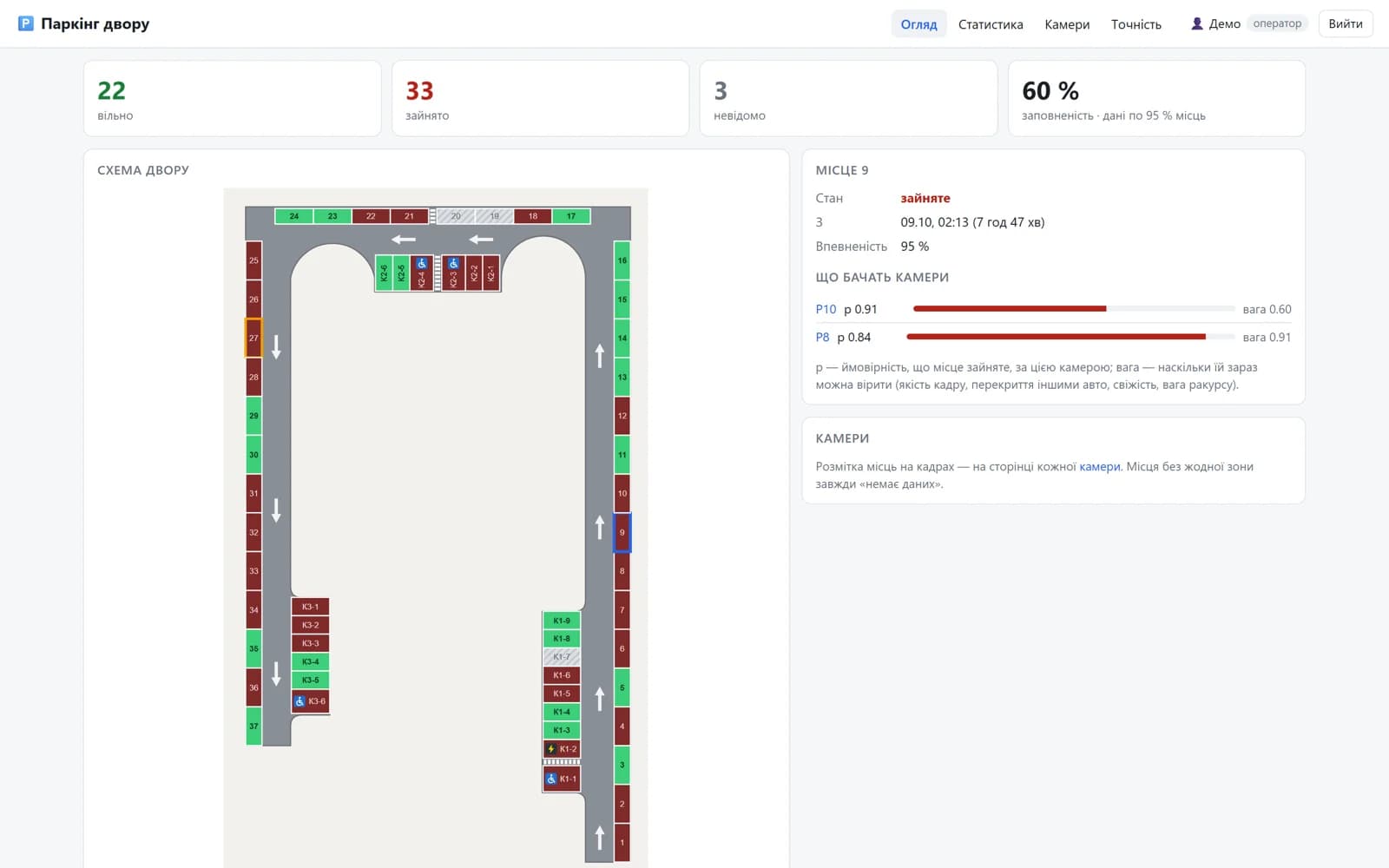
Spot Watch turns the existing cameras into a live map of the courtyard. Residents open a page and see every spot as free, occupied or unknown on a plan of the yard; operators click a spot to see what each camera sees and how much it can be trusted right now.
Under the hood a YOLOX detector finds cars only inside the zones of interest, skips cars that are still moving, and scores how well each car sits in each marked spot. Every camera's view is weighted by its current quality — night, overlap by other cars, zone size, freshness — and the views are fused into one decision per spot, with short delays so a passing car never flips the state. The system also watches the cameras themselves: frozen, black or overexposed frames and cameras that have been knocked off their angle are flagged automatically.
Setting up a yard is fast: a browser editor lets an admin draw spots on a camera frame — or a whole row in one go, split with perspective — and after about half a day of observations the system suggests corrections where the marking doesn't match where cars actually stand.
Key capabilities
- 01
Live courtyard map
Every spot free, occupied or unknown on a plan of the yard, with how long it has been that way.
- 02
Multi-camera fusion
Overlapping cameras vote, weighted by image quality and occlusion, so one bad view can't flip a spot.
- 03
Camera health watch
Frozen, black or overexposed streams and cameras knocked off their angle are detected and flagged.
- 04
Browser zone editor
Draw spots or whole rows on a camera frame, then accept data-driven suggestions to fix the marking.
- 05
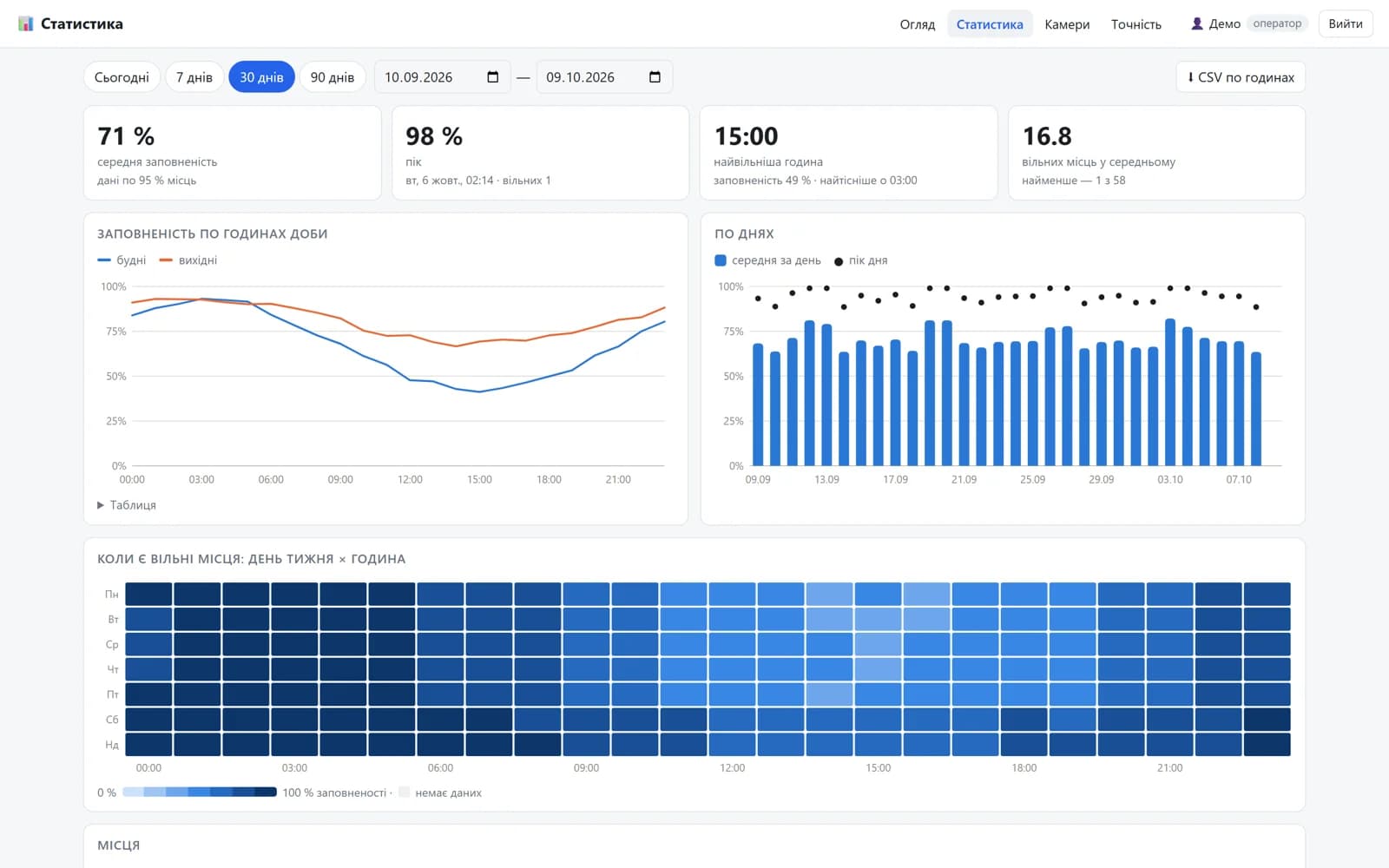
Occupancy analytics
Peaks, quietest hours, weekday vs weekend, a heat map and per-spot usage — exportable to Excel.
- 06
Secure by default
Role-based access, camera passwords encrypted at rest and masked everywhere, tested deploys with a backup first.
Screens
The result
Spot Watch runs in production on 10+ cameras covering a 58-spot courtyard. It runs on the same compact server that already runs license plate recognition, using its integrated Intel GPU for detection.
Occupancy statistics — by hour, by day, a day-of-week heat map and per-spot usage, with CSV export — give management real data for decisions about guest parking, rules and pricing. Any site with IP cameras over its parking can be connected the same way, without sensors in the ground.
Technology
- Python
- YOLOX
- OpenVINO
- ONNX Runtime
- OpenCV
- FastAPI
- PostgreSQL
- go2rtc
- Docker Compose
Want something like this for your business?
Tell us about your idea or the process you want to automate. We'll propose a solution, a timeline and the first working version.
Next case
Meter Minder
Energy monitoring for apartment buildings: every smart meter and inverter in one dashboard, anomalies flagged, readings submitted automatically.